skip to main |
skip to sidebar
Home » All posts
Posted by
marco
So How do we use VMware tools to Install Windows 8 on VMware software?
This article will help you install windows 8 on VMware software using VMware tools. The whole installation process takes only about 10 minutes depending on your computer and resources available for virtual machine. The Windows 8 installation process is straight forward and you can choose default options or select obvious settings. It will ask for a Windows 8 product key which you can skip and choose to provide it later.
The Windows 8 Developer Preview is a preview of what an operating system is expected to look and feel like once development is complete. While you may be months or even a year away from seeing the release version of Windows 8, you can still take advantage of this program for a quick glimpse of what is ahead.
For users who switched away and for those also who stayed away through Windows Vista and Windows 7, Windows 8 marks one of the most significant user interface changes. Like Windows 3.11 gave way to Windows 95. The Start menu is entirely different, and the user interface is geared towards a blend between traditional and touch-based applications.
Step by step 10 instructions on how to install Windows 8 on VMware Software:
1) Download Windows 8 installer from the official Microsoft Windows website.
2) Install VMware software. The installation is a straight forward process. During installation, you will have to provide the VMware product key you received in the email.
 3) Launch VMware software. You can find the shortcut to launch VMware software on your desktop or start menu.
4) Create a new Virtual Machine by clicking on the appropriate link in the welcome screen or in the File menu.
5) When you create a new virtual machine, choose the option "I will install the operating system later."
The option to install from the Windows 8 installer ISO image may not work since VMware cannot recognize the Windows 8 operating system yet.
6) Choose Windows as the operating system. Since you will not find Windows 8 in the list, choose Windows 7 or Windows 7 64-bit, whichever is appropriate. Choose the default options or appropriate options in all other screens.
7) After you complete creating the new virtual machine, VMware will open the new virtual machine with a blank screen.
8) Click on the "Power on this virtual machine" option. It will try to boot the virtual machine. However it will fail to start the operating system since there is no operating system installed yet.
9) Mount the ISO image as DVD drive and install Windows 8 from it. To mount the Windows 8 ISO image, click on the tab for your virtual machine in VMware window and select "Removable Devices" à "CD/DVD (IDE)" à "Settings".
10) Click on the “CD/DVD (IDE)” option on the left side. On the right side, choose the option "Use ISO image file" and select your Windows 8 installer ISO image file.
You are all set to install Windows 8 on the VMware software. All you have to do is click on "Restart VM" at the bottom of the VMware software screen and it will restart the virtual machine and boot from the Windows 8 ISO image.
Now that you know how to use VMware tools to Install Windows 8 on VMware Software, why don't share this amazing tips to our friends, it's just a click away.
More about → How to Install Windows 8 on VMware Software
Posted by
marco
This is just a basic and simple method on How to Unprotect an Excel Sheet, yes, you read it right, while lots of people thought it was hard, it turn out to be very easy thing to do.
Unprotecting an Excel sheet is surprisingly easy. If your Excel sheet is password protected and you do not know the password, there is no way that you can unprotect the sheet in that particular workbook – but you can create a new workbook which will contain exactly the same formulas, formatting and values that will not be protected and will be editable.
How to Unprotect a Non-Password Protected Excel Sheet
Open up the Excel document.
Click on the “Review” tab.
Click “Unprotect Sheet” or “Unprotect Workbook.”
How to Unprotect a Password Protected Excel Sheet
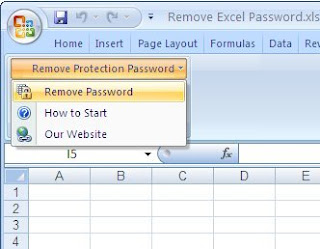
- The first way to do this is to copy and paste the contents into a new workbook. This sounds very simple and is very simple but most people do not even consider this option due to its simplicity.
- In the case that your Excel sheet is password protected and you cannot select the cells on the Excel sheet, you are going to need to make use of a web-based spreadsheet solution – namely Google Spreadsheet.
- Upload your spreadsheet into Google Spreadsheet.
- You can now already edit the file, from within Google Spreadsheet. If you wish to make a copy that you can also edit in Excel, simply export the spreadsheet into an .xls file. Simple.
How to Remove Protection from an Excel Sheet using Google Docs
Another way to remove protection from an Excel sheet without the password or access to the document creator is to import it into the Google Docs Spreadsheet program, which will remove protection once the document is imported.

Step 1 – Create a Google account at gmail.com or use an existing one.
Step 2 – Log into Google Docs with a google account at: docs.google.com by entering a login name and password.
Step 3 – Click “Upload” then the “Select Files to Upload” option on the subsequent window.
Step 4 – Use the Google file chooser to locate the spreadsheet file to be uploaded and that protection will be removed from.
Step 5 – View and edit the data file after it is successfully imported into Google Docs.
So now you know How to Unprotect an Excel Sheet, it's pretty easy, right?
More about → How to Unprotect an Excel Sheet
Posted by
marco
This is the tips on How To Get Windows Phone Looks On Android, Windows Phone 7 is a continuation of the Windows Mobile OS that has a view or a different UI than any other OS that uses a reference icon centric. WP7 has a UI which is called by Microsoft "Metro UI".
For some people who've tried the UI of Windows Phone 7 will be impressed with how it looks, it is just plain simple but elegant.
But WP7 handset prices are relatively expensive and not as much as the number of applications and flexible as Android, that then becomes a reason for the gadget lovers are less interested with this Microsoft OS.
Here we will change the whole UI Android into WP7 like that friend you also will not recognize your Android again or even think you've just bought a new WP7 handset.
 Before embarking on we just wanne let you know that some of these applications are advised to Android handsets with HDPI screen resolution 480 × 800 or above. But it can still be used for MDPI handsets which has a screen resolution of 480 × 320. However, it is not advisable for Android handsets that only has a LDPI (240 × 320) because it will reduce your comfort in exploring the handset menu, and for anticipation, don't forget to install the application launcher such as Homesmack switcher so you can easily switch to your default homescreen if some unwanted things happens.
If everything has been fulfilled you can follow these steps:
Launcher 7
Launcher 7 is an Android application that can change your homecreen looks just like WP7 and can be downloaded for free on Google Play with the choice of the paid version which is priced reasonably at US$ 1.98 and "Lite" version is of course filled with banner ads. Its advantage from other application launchers is that on Launcher 7, we can freely customize the appearance of tiles on the homescreen, animation, setting Live Tiles which of course will make your Android homescreen looks just like on WP7.
How to increase the number of tiles on the homescreen is very similar to the methods used on WP7. In order to have the similar application tiles like WP7 you can download some tile skin packs on www.launcher7.blogspot.com for free.
Adjust the tile image with applications that you have by long tap on the tile to change and tap the pencil logo in the corner of the tile and select custom icon in the "icon" section then tap on "Select image from SD Card" select the desired image, Then select "Tile options" and select "Full-tile bitmap (1 × 1 only)" if you choose a size of 1 × 1 tile. This option will make the whole image is contained fully on the tile.
Phonebook application
There are 2 options for a substitute from the default Android phonebook theme to WP7, and they are WP7 Contact or WP7 Dialer - Lite. At first glance both function and appearance of these applications are similar but WP7 Dialer - People Lite has the look and comes with a Facebook News Feed, although sadly WP7 Dialer seems to have stopped developed.
It is so often to crash when used in the latest Android handset than WP7 Contact applications which are updated monthly. WP7 Contact also available with a paid version on Google Play at a price of US$ 2.99.
Media Player
The only media player that looks like WP7 is Zplayer, its functionality and its theme was exactly the same as Zune Player on WP7. Zplayer also features artist biography, artist similiar, charts, podcasts, video player and equalizer.
Unfortunately this application does not have any lite version. But just so you know, the application even priced at US$ 3.20 on Google Play, it is worth having because of its very complete features.
Lockscreen
You can change the default lockscreen with WP7Lock Android, the application also comes with messages, emails, and missed calls notification on the lockscreen. So you may be able to monitor your handset without having to open the lockscreen. Applications are available in the paid version that is priced at US$ 2 and Lite version which unfortunately is full of bugs, features that are limited and often crash when used.
We can also add to WP7 Notification other features that is contained in WP7, for instance this application can display SMSs, emails, missed calls notifications, and even IM chat from some of the Android apps can be displayed too, just like on WP7.
Messaging
Change the default SMS application with Messaging Metro Beta. With this application you can send SMS with a fast and responsive pace like WP7 style of course.
This application is still in Beta stage, but continue to receive the latest updates every month.
Keyboard
It will not be complete if we still use the default Android keyboard. You can change your keyboard by installing Better Keyboard, alongside Windows Phone 7 skin.
Additional applications
To make the atmosphere of WP7 better on your Android, you can also install Seven + Calculator which also has similar features to the calculator in WP7.
By installing the above applications, you will gain the WP7 experience in your Android. And for those of you who are quite comfortable to use Android for sure you do not need to replace your handset with a handset just to try WP7 Metro UI's interface WP7. And That is How To Get Windows Phone Looks On Android, enjoy WP7 on your beloved Android ^_^
More about → How To Get Windows Phone Looks On Android
Posted by
marco
This is How to Designing Your Own House With Sweet Home 3D
For fans of the game build a house like The Sims, then it will not feel alienated by this game. Sweet Home 3D is an application that shows users the ease of using an application to support us in making the simulation of a home interior design. The application is in addition easy to operate, are also easily obtained.
Download the application will not be difficult and the file size is also not large. To face the problem of Sweet Home 3D is simpler when compared to similar applications such as 3dsmax. It is targeted for users of these applications are ordinary people that do not require a lot of serious learning to operate it.
Sweet Home 3D is designed specifically for interior design enthusiasts and for users who do not go into interior design scholarship itself. So for someone who does not understand interior design at all able to use and operate these applications and get a house or a room design form desired. Another convenience offered by this application is easy to download data from the application program. This application is still not traded and is still free if you want to download.
In addition, if the furniture or furniture that is in the application it is less, then the user can download or add to the other furniture in http://www.sweethome3d.eu/importModels.jsp. there are over 200 models of furniture that can be used to embellish the design house or a room that has been made.
 In appearance, Sweet Home 3D using 3-dimensional, so any changes that users do on the plan can be instantly displayed virtually. There is also a plan view showing where the user can draw and put the furniture and equipment available. To fill the room or home furnishings catalog has been provided which has many kinds of furniture and can still be added if it is felt that existing furniture does not meet the wishes of the user, and also on the interface displayed on the dimensions of the furniture that has the user select so as to adjust with precision the user want.
Here are some sample screenshots of the 3D Sweethome.
- Here's a screenshot when we start the application Sweethome 3D
- This is the types of equipment / furniture that we can put our house in the model.
- Picture above is a detail of the furniture that we put in the model, which contains the length, height and width.
- And the picture above is a picture of model homes are almost completed the process
With the free modeling applications like Sweet Home 3D it is very easy for ordinary people to be creative to design homes or places as they want, with 2D or 3D models. So, if you have a dream to have your own home and with your own design, you could just try Designing Your Own House With Sweet Home 3D.
More about → Designing Your Own House With Sweet Home 3D
Posted by
marco
This is not just a rumour, it is a fact, and we're warning you all to Beware The Threat Of Using Iphone Accessories, because here in this very article we're gonna share about the Damage Due to face Allergy of the iphone 4 Accessories happens to a woman from Kirby, Liverpool.
Allergy iPhone 4 accessories could actually make the face is damaged, who would have thought that an allergic reaction from iphone holster can be obtained from the unexpected. iPhone 4 popular smartphone accessory that comes in various types of materials, form and color of this fact can cause a specific reaction for some people.
This tragedy began when a woman from Kirby-Liverpool, England named Jenny Taylor bought silicone accessory for her iPhone 4. Griffin FlexGrip Punch accessory manifold for 16 pounds, this cover provides an allergic reaction to a woman who was so great that 30 years, as quoted from Dailymail.
After feeling itchy annoying when using silicon iPhone 4 already fitted, she then saw a swelling that looks exactly the same as her iphone shape attached to the ear and cheek. So bad, until her mother did not recognize her and immediately took her to a nearby hospital.
First aid obtained from the hospital is only anti-histamine drugs, and she was sent home. But the next morning, the more severe allergic reactions and make her face swell up like a 'half-beaten black and blue'. Coupled with a swollen eye and neck so that it is difficult to see and swallow.
 And she returned to the hospital and was diagnosed with 13 different allergies after previous treatment. And she has warned that she was also allergic to the ingredients jeans, coins, doorknobs. Allergic reactions of this complex also cause intense burning, itching, redness, swollen blisters on Jenny's body.
After serving more than 140 allergy tests at the Royal Liverpool University Hospital, found that the silicon used iphone Jenny is the cause of the arrival of 13 types of allergies that make life and her a 'mess'.
The doctor who examined also suggested that she always wore gloves wherever she goes or touch anything, but because she did not want to further decrease her immune and she still runs her life as usual.
Events that took place in November last year it has been reported to the Apple Store to silicon manufacturers Griffin, but Jenny admitted to date, none of the response from both parties are adverse. She said: "I just do not want anything like this happened to anyone else, because it really makes my life a mess." So it's not our loss to Beware The Threat Of Using Iphone Accessories in the first place.
More about → Beware The Threat Of Using Iphone Accessories

 For users who switched away and for those also who stayed away through Windows Vista and Windows 7, Windows 8 marks one of the most significant user interface changes. Like Windows 3.11 gave way to Windows 95. The Start menu is entirely different, and the user interface is geared towards a blend between traditional and touch-based applications.
 The option to install from the Windows 8 installer ISO image may not work since VMware cannot recognize the Windows 8 operating system yet.
 9) Mount the ISO image as DVD drive and install Windows 8 from it. To mount the Windows 8 ISO image, click on the tab for your virtual machine in VMware window and select "Removable Devices" à "CD/DVD (IDE)" à "Settings".
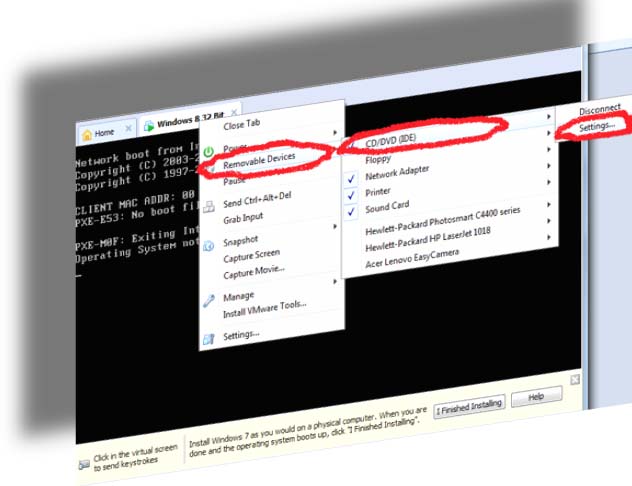 10) Click on the “CD/DVD (IDE)” option on the left side. On the right side, choose the option "Use ISO image file" and select your Windows 8 installer ISO image file.
 You are all set to install Windows 8 on the VMware software. All you have to do is click on "Restart VM" at the bottom of the VMware software screen and it will restart the virtual machine and boot from the Windows 8 ISO image.


